The main difference: who does the editing
In CapCut, you are the editor. Its AI tools — AutoCut, Video Studio, automatic captions — speed the work up, but you still open the project, check the timeline, export the file and post it.
In Weyvox, you describe the result and Alice does the editing: she watches your videos, picks the moments, builds the edit and checks it. You see the finished video, ask for changes in plain words — “shorter”, “captions at the bottom”, “warmer colours” — and tap Publish. There is no timeline to learn and nothing to export or upload.
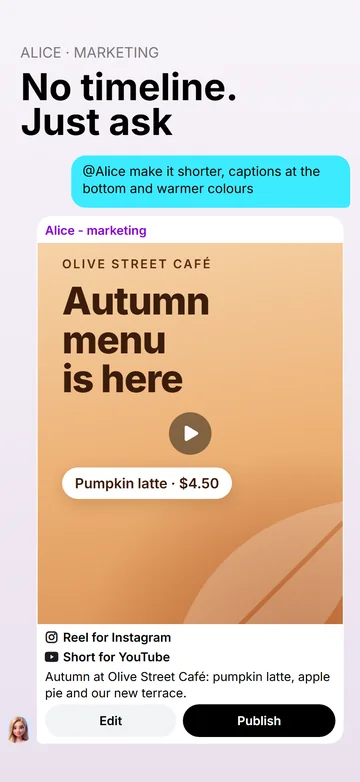
How Alice edits a reel, step by step
- You send the material. Photos and videos in the chat — up to 20 per message — or from Materials for the agent, with a word on what the reel is for.
- She watches it. Every video is analysed once: scenes, what is said, text on screen, quality problems. She never identifies people.
- She builds the edit: the best moment as the hook in the first seconds, cuts between words, text on screen, captions, sound and your logo.
- She checks it before you do. The preview is rendered in full quality and is not charged; Alice looks at its frames and at an automatic quality report and fixes what is wrong.
- You get the post card — the video and the text for each network, as they will be published.
- You tap Publish, and that very video becomes the final one, without rendering again — or you ask for changes in the chat.
In the chat, every reel waits for your Publish. If you give Alice a weekly Social media plan and switch on her Autonomy, she prepares and schedules the plan's posts herself — but a video with defects still waits for you.
What Alice's video editing can do today
- Material. Your phone videos — iPhone HDR included, up to 10 GB a file — and photos, plus short AI clips Alice makes (3–10 seconds), a voice-over, music and sound effects.
- Formats. 9:16 for Reels, Stories, TikTok and Shorts; 4:5 and 1:1 for feeds; 16:9 for YouTube or a website. A reel is up to 90 seconds, in Full HD, at 60 frames per second when your footage is.
- Framing and picture. When a horizontal video goes vertical, the crop can follow the main person, and the faces of passers-by or customers can be blurred. Shaky clips can be steadied, dim or bluish footage corrected and one colour look applied to the whole video.
- Movement. Slow zooms and pans on photos, eight transitions besides a plain cut and a speed from 0.5× to 2× for each clip.
- Text and brand. A hook, a price, a list, a call to action, a title, brand cards at the start and the end; your logo, colours and font, with key words in your brand colour.
- Captions. Word by word, from any voice — the voice-over, your own recording or people speaking in your videos — with the position, size, font, colours, outline, background and animation set for the video.
- Sound. The clips' own sound, cleaned up when it is noisy; music that drops under speech by itself; loudness evened out for social networks.
- A cover for Instagram Reels and Pinterest.
A quality check before you see it
Every reel goes through an automatic check of the finished file: black or frozen frames, sudden silence, loudness, text that is cut off, text under a network's buttons and text that is hard to read on its background. Alice goes through the preview's frames and the results of this check before the post card reaches you. She also gets warnings about the edit itself — a shot cropped too much, a photo held still too long, music shorter than the video (it is then looped) — and fixes each one herself unless it is intended.
If a defect is still there when you tap Publish, the app shows what was found and where, and the video goes out only after you confirm Publish anyway — a pause that looks like silence may be on purpose. Alice never publishes a video with defects on her own.
Weyvox and CapCut side by side
As of October 2026. CapCut changes often, and some of its features depend on the plan and the country — check capcut.com for the current details.
| What | Weyvox — Alice | CapCut |
|---|---|---|
| Who edits | Alice, from what you ask in a chat | You, in the editor, with AI tools to help |
| Where | The Weyvox app on your phone (iPhone and Android), in one chat with the rest of your AI team | Phone, desktop and web apps |
| Manual control | None: you ask for changes in words | A full timeline: layers, keyframes, masks, chroma key |
| Length and quality | Reels up to 90 seconds, Full HD, up to 60 fps | Long projects, export up to 4K at 60 fps |
| Speed | 0.5× to 2× per clip | Speed curves from 0.1× to 10×, reverse, freeze frame |
| Effects and templates | 8 transitions, 5 colour looks, text styles; no template library | Thousands of effects, filters and stickers; a large template library |
| Captions | Automatic, word by word, from any voice, in your brand's colours | Automatic captions in many styles, bilingual captions |
| AI generation | Clips of 3–10 seconds without speech, voice-over, music, sound effects | AI video, AI avatars, lip-sync, dubbing — some on paid plans or not in every country |
| Your business | Alice keeps your logo, colours and font for every video; prices and offers come from your business profile and price list | Brand assets — logos, fonts, templates — saved in the desktop app; prices and offers are typed in by you |
| Quality check | Automatic, before you see the video; a video with defects goes out only after your confirmation | You check it yourself |
| Publishing | A post with its own text for each network — now or scheduled up to 30 days ahead, on eight networks (to TikTok as a draft) | You export the video and share it from the app; scheduling to TikTok, Instagram and Facebook is in Pippit, a separate tool powered by CapCut |
| Price | Editing: 10 credits for each started half-minute (90 seconds — 30 credits), previews not charged; paid from your plan credits | A basic version at no cost; paid Standard and Pro plans ($9.99 and $19.99 a month in the US App Store) |
CapCut is a trademark of its owner; Weyvox is not affiliated with CapCut. The details about CapCut come from its own pages: export, speed, Video Studio, brand assets, Pippit publishing.
Which one to choose
- CapCut, if you enjoy editing and want full control; if you need trend templates, many effects, long videos, 4K or AI avatars; if making videos is your craft.
- Weyvox, if you run a small business and want regular reels from what you film without learning an editor; if each reel should carry your brand, your prices and a text for each network and go out on schedule; if the same app should also answer your calls and handle customers and documents.
- Both, if you like: edit a long video yourself in CapCut and leave the weekly reels to Alice. Any video she makes can be saved to your phone's gallery — open it in the chat or in Materials for the agent and choose Save in its menu — and you can keep working on it in an editor; a video you finished yourself can be published from Materials for the agent at no extra charge, or, up to 90 seconds, go through her edit and quality check like any reel, at the editing price.
What it costs
Weyvox prices are in credits: 1 credit = €0.01 excl. VAT. Editing a reel costs 10 credits for each started half-minute of the finished video — 30 seconds is 10 credits, 90 seconds is 30 — and the preview is not charged. Watching your videos before the edit is 5 credits per started minute of each video, music 25 credits a track, a voice-over 30 credits per started 1,000 characters. It is paid from your plan's monthly credits first: Start is €19 a month excl. VAT with 2,500 credits.
A typical reel — 30 seconds cut from three short videos, with a music track — comes to 3 × 5 + 10 + 25 = 50 credits, plus Alice's work in the chat at token rates. A CapCut subscription pays for an editor; a Weyvox plan pays for the whole AI team — calls, customers, documents and social media. Every unit price is on the pricing page.
What Alice's editing does not do
- A timeline. There is no manual editor; changes are made by asking Alice.
- Long or 4K videos. A reel is up to 90 seconds, in Full HD.
- Layers and keyframes. No picture-in-picture, masks, chroma key or speed curves.
- A template library or sticker packs. She builds each reel for your business instead.
- Talking avatars or a copied voice. AI clips are 3–10 seconds without speech; voice-overs come from a library of voices, and a real person's voice is not offered.
- A video with defects without you. It goes out only after your Publish anyway.
- Promised views. Nobody can guarantee views, followers or sales, and Weyvox does not.
Every one of Alice's screens is described in the documentation.
Questions people ask
Is Weyvox an alternative to CapCut?
For a small business that wants finished reels rather than an editor, yes: in Weyvox, Alice — the AI marketing agent — edits reels of up to 90 seconds from your photos and videos, adds captions, sound and your brand, checks the result and publishes it to your networks after you tap Publish. If you want to edit by hand, or need templates, effects, long videos or 4K, CapCut is the better tool.
Do I have to edit anything myself in Weyvox?
No. You send the material and say what the reel is for; Alice picks the moments, cuts it, adds text, captions and sound and shows you the finished post. Changes are asked for in plain words in the chat — there is no timeline.
How long can a video edited in Weyvox be?
Up to 90 seconds, in Full HD, at 60 frames per second when your footage is. The formats are 9:16, 4:5, 1:1 and 16:9. For longer videos or 4K, use an editor such as CapCut.
Does Alice add captions automatically?
Yes, word by word, from any voice in the reel — her voice-over, your own recording or people speaking in your videos — in a style that suits the video. You can ask for another position, size, colour or animation.
What happens if the video has a defect?
An automatic check measures every reel — black or frozen frames, sudden silence, loudness, text that is cut off, sits under a network's buttons or is hard to read — and Alice fixes what she finds before you see it. If a defect remains, the app shows it when you tap Publish, and the video goes out only after your Publish anyway.
How much does editing a reel cost in Weyvox?
10 credits for each started half-minute of the finished video (1 credit = €0.01 excl. VAT): 90 seconds is 30 credits, and the preview is not charged. Watching your videos is 5 credits per started minute, music 25 credits a track. It comes out of your plan's monthly credits — Start is €19 a month excl. VAT with 2,500 credits.
See Alice edit your own footage
The quickest way to see her at work is the introduction right after you sign up: tell Leo what your business does, and Alice can make a photo for a post about it, one clip of up to 5 seconds or a reel from your own photos and videos — all at no cost and before you choose a plan. Weyvox is available for iPhone and Android.
AI video maker for Reels, TikTok and Shorts · Plans and prices · All guides