How AI phone calls work: one line in the chat
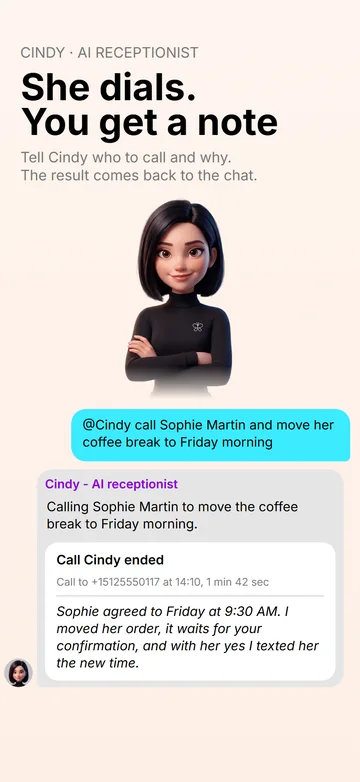
You do not set up a campaign or write a script. You write in the team chat, the same way you would ask a colleague: “@Cindy, call Sophie Martin and move her boiler service to Friday morning.” Or you tell Leo what you need and he hands the job to Cindy — the chat shows it as “Leo → Cindy”.
- The number. Give it yourself, or ask Cindy to find it in your phone's contacts. Full international numbers (+…) connect reliably; short service codes may not.
- The goal. One plain sentence is enough: confirm a visit, remind about an unpaid invoice, ask a supplier where the delivery is, find out a price.
- The call. Cindy dials the real number, says who she is and why she is calling, and takes the conversation to a result.
- The result. When the call ends, a note with what was agreed and what is still open lands in the same chat.
For the calls you keep putting off. Some calls are easy to postpone: chasing a customer who owes you money, moving an appointment, asking a supplier why the delivery is late, ringing an office abroad in a language you do not speak well. Those are exactly the calls you can hand over in one line. You do not have to be on the line: Cindy makes the call and you read the note. If you want to hear how it goes, open the mini call card and listen — you speak only if you decide to take the call over.
What Cindy does on the call
- Introduces herself as an AI agent at the start of every call, acting for you or your business, and says that the conversation is recorded for a call note — transcribed as text; no audio is stored. This is not a setting and cannot be turned off.
- Talks at the pace of a live conversation. She hears tone of voice and does not lose track when she is interrupted.
- Gets through phone menus. On the way she presses the keys of automated menus.
- Does not talk to answering machines. If voicemail picks up, she leaves no message and hangs up.
- Checks before she promises. Prices come only from your price list, and a time is offered only after checking your calendar and the orders already booked.
- Records what was agreed. When the person agrees to buy or book something, she records the customer and the order before saying goodbye; the order is marked Not confirmed until you check it and tap Confirm.
- Never marks anything paid. A payment is recorded only on your word.
- Notes what is still open when the matter cannot be settled now — a department is closed, the right person is out — so you find it in the note.
- Ends the call herself once the matter is settled.
After the call: the result in the chat
The note arrives in the chat you started from, written in the language you write to the agents in (your app language until you have written to them) — even if the call itself was in French or Polish. Call audio is not stored; the text of a call from the chat stays available to the agents for 24 hours, so you can ask follow-up questions (“what exactly did they say about Thursday?”) — after that, the note is what remains. If something changed for a customer, the order is updated in the order list that Marc keeps; if the customer agreed a new time, address or price on the call, Cindy offers to text them a confirmation and sends it once they say yes. The SMS comes from “Weyvox” and starts with your business name.
While a call from the chat is running, you can open it in the app as a mini card: listen in, take the call over, or end it.
Autonomy: ask first, or call on her own
Every agent in Weyvox has an Autonomy setting on its page. For Cindy it decides one thing — whether she waits for your yes before dialling:
- Off. Before every call from the chat she shows a card with the number and the purpose, and dials only after you confirm. Background tasks call no one.
- On. She places calls herself, from the chat and in background tasks.
Autonomy comes with the Business and Professional plans. On Start the switch is visible but off, with a lock, so Cindy shows the card before every call from the chat.
Calls as steps of a goal
Sometimes one call is not the point — a result is. That is what Goals are for. You tell Leo what you want, for example “20 new customers in October” or “fewer unpaid invoices by the end of the month”, and he proposes a plan in which each step belongs to the right colleague. For “fewer unpaid invoices”, that could be: Marc lists who owes what, Cindy calls those customers about their overdue invoices, and Marc keeps track of who has paid.
- The estimate is calculated by the server from Weyvox's own rates, not guessed by the model. You set a spending limit.
- Tapping Accept the goal is your permission for exactly the actions listed on the card — nothing else is done under that goal.
- Before every step, spending is checked against the limit. Every paid action — a call, an SMS — is reserved against it before it starts; only the agents' own work on a step already under way can take a goal slightly over its limit. When the credits under the limit run out, the goal pauses, you get a message, and it continues only if you raise the limit.
- Leo checks each step — one that falls short goes back for rework, once — and reports how the goal is going.
Calls inside a goal run in the background, so they need Cindy's Autonomy on and an operator number; with Autonomy off, the steps call no one. Goals are part of the Business plan (3 per calendar month) and the Professional plan (no limit).
Over 40 languages
Cindy opens in the language the person most likely speaks — judged from the country of the number and what she already knows about the contact — or in the one you name (“call them in German”). As soon as the other person clearly speaks another language, she moves to it. This is where an AI that calls for you earns its keep: a supplier abroad, a customer who does not speak your language, an office in another country.
Which number she calls from
Cindy calls from your Weyvox operator number, which you buy inside the app: Settings → Cindy → Buy a phone number. In some countries the operator checks documents first. Together with the first number of the purchase you can then take a temporary number for a one-time 200 credits: it works at once, so Cindy can call while the check runs; if the main number is not approved within 25 days, the temporary one is switched off and the application stays open. Without an operator number she cannot place calls.
If you connected your existing business number and confirmed it with a code, outgoing calls can show that number, so people see the number printed on your cards. With a mobile business number, some networks may not display it on calls routed through another operator — the app warns you about this before you turn it on.
What she will not do
- Call a number that has opted out. Anyone can block calls and SMS from Weyvox agents to their number at weyvox.com/optout.
- Replace your phone for emergencies. Emergency numbers are for you to call from an ordinary phone.
- Guarantee an outcome. The other side can say no, and an agreed time can still be cancelled later.
- Work without credits. When the plan credits and extra credits are both used up, calls stop until you buy extra credits or the next month's plan credits arrive; without an active subscription they pause even with credits left.
Cindy and the other agents
Cindy is the AI receptionist in Weyvox. She shares one business profile, price list and customer list with the other agents, and they hand work to each other. That is why a call does not end with a note: what Cindy agrees becomes an order that Marc, the AI manager, can invoice, and a promise that Leo, the AI coordinator, can remind you about. A post by Alice, the AI marketer, quotes the same prices Cindy gives on the phone.
What an AI phone call costs
Weyvox prices are in credits: 1 credit = €0.01 excl. VAT. A minute of the agent on a call costs about 21 credits — 12.5 credits for the voice and the conversation plus the agent's work — and on top of that the operator line, which depends on the country you call. It is paid from your plan's monthly credits first and from extra credits after that. Every unit price, including SMS and each country's line rate, is on the pricing page.
Questions people ask
Can AI make phone calls for you?
Yes. In Weyvox you tell Cindy, the AI receptionist, who to call and why. She dials the real number, introduces herself as an AI agent, handles the conversation — including automated phone menus — and leaves the result as a note in the chat.
Does the person know they are talking to an AI?
Yes. Cindy says she is an AI agent at the start of every call, and that the conversation is recorded for a call note (transcribed as text; no audio is stored). It is not a setting and cannot be turned off.
Will the AI call people without asking me?
Only if you allow it. With Autonomy off she shows a card with the number and the purpose before every call and waits for your yes; with it on (Business and Professional plans) she calls straight away, from the chat and in background tasks.
Which number does the other person see when AI calls them?
Your Weyvox operator number, bought in the app. If you connected and confirmed your existing business number, calls can show that number instead.
What languages can an AI calling agent speak?
Over 40. Cindy opens in the language the person most likely speaks, or the one you name, and moves to theirs if they answer in another. Your note always comes in the language you write to the agents in (your app language until you have written to them).
Can an AI make phone calls for me if I don't like calling?
Yes — you can hand those calls to an AI calling agent. In Weyvox you write one line to Cindy: who to call and why — move an appointment, chase an overdue invoice, ask a supplier about a delivery, find out a price or agree a time. She makes the call from your business line, says she is an AI agent, gets through phone menus and brings back a note with what was agreed, so you read the result instead of making the call. While it runs you can listen in from the mini call card and take it over only if you want to.
Let Cindy make the next call
The quickest way to hear her is the introduction right after you sign up: if you pick Cindy for your team, she gives you a test call on your own phone at no cost (up to two, each up to 6.5 minutes), tells you by voice how she will work for your business and answers your questions — before you choose a plan. Weyvox is available for iPhone and Android.
Cindy, the AI receptionist · All guides